


.png)


Invoice conversations now happen on the invoice
AP Invoice Chat brings internal discussion and vendor correspondence into Vic.ai, attached to the invoice they're about.
Most of the work of clearing an invoice isn't processing it. It's asking about it.
A line doesn't match the PO, and someone has to find out whether the goods were actually received. A coding decision needs a second opinion before it posts. An invoice arrives with Net 30 terms when the contract says Net 60, and someone has to raise it with the vendor and get an answer back.
Those exchanges happen dozens of times a week in every AP team. Until now, they happened everywhere except in the system where the invoice lives. An email thread in one place, a Slack message in another, a question asked in passing and answered the same way. The invoice sat in Vic.ai and the reasoning behind it sat in three other tools.
The cost of that split shows up later. When someone asks why an invoice was paid the way it was — a month on, at close, or during an audit — the answer has to be reconstructed from memory and inboxes. Often by someone who wasn't part of the original conversation. Sometimes by someone who has since left.
AP Invoice Chat from Vic.ai closes that gap. It adds a threaded conversation directly to each invoice in Vic.ai, so the discussion and the document stay together.
Ask the person who knows, without leaving the invoice
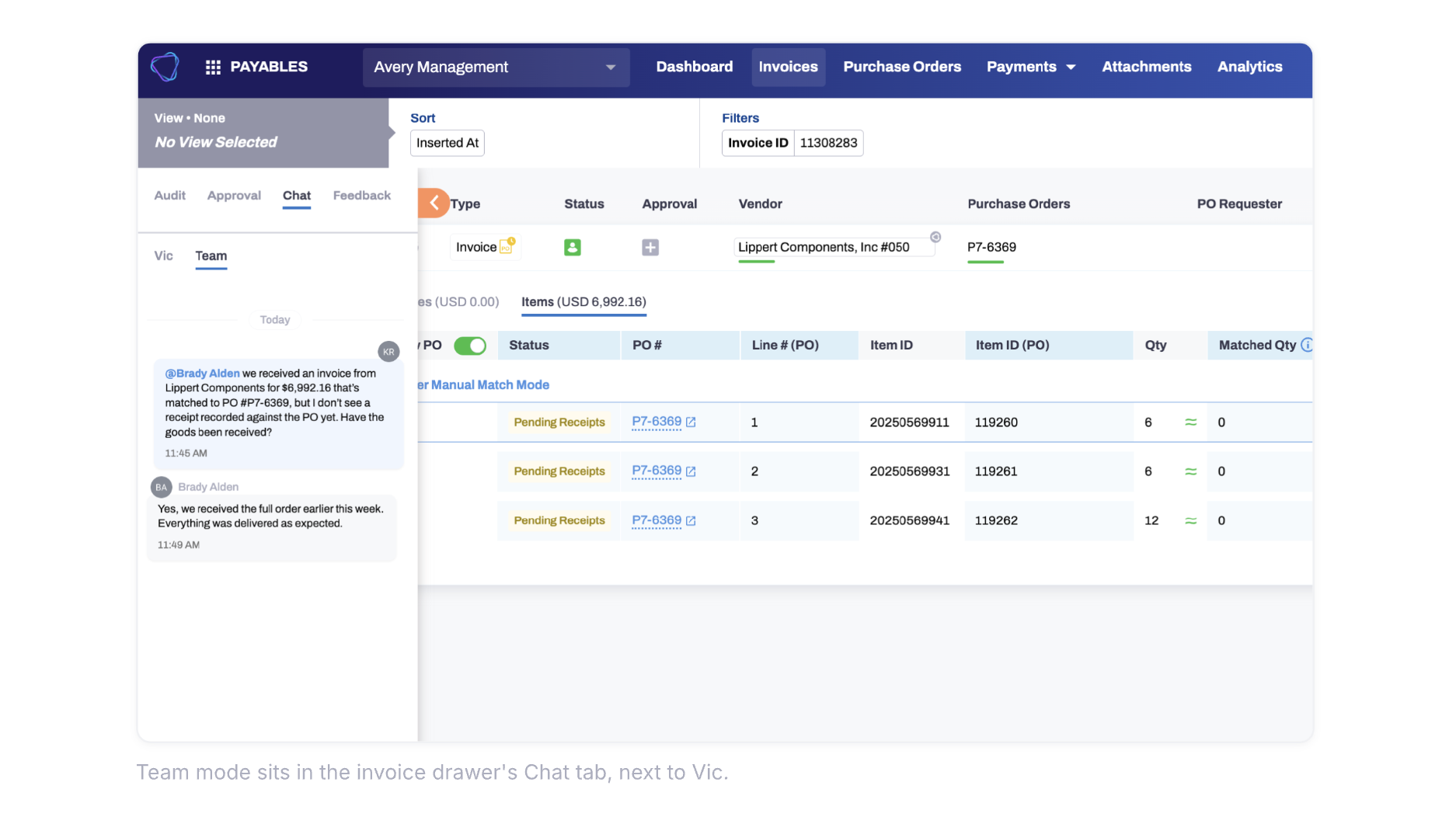
Open an invoice, select the Chat tab, and switch to Team. Type a message. Type @ and a colleague's name to bring them in — they get an in-app notification linking straight to that message in that thread.
The details matter here more than the concept. The typeahead shows you who you're actually reaching: a teammate who doesn't have access to that invoice is flagged before you tag them, and deactivated users can't be selected at all. Invoice approvers and PO mismatch approvers can participate from their own queues, which means the person holding up an approval can be asked about it where they already work.
You can also run more than one thread on the same invoice. A pricing dispute and a coding question are different conversations, and mixing them helps no one.
Loop in the vendor without asking them to log in anywhere
The part that changes the shape of the workflow is external participation.
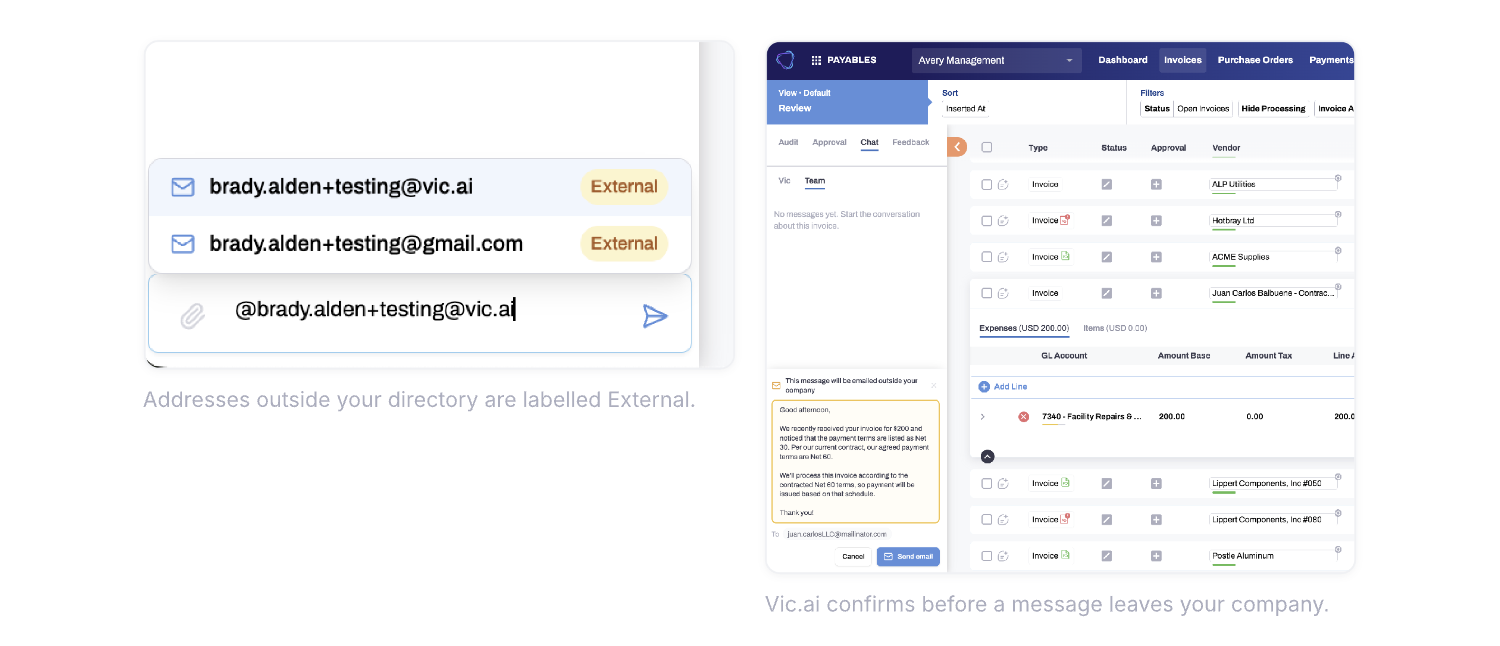
Type @ followed by an email address that isn't in your company directory and Vic.ai offers to add it as an external recipient. Send the message and the vendor receives an ordinary email — from your company, via Vic.ai, with the invoice number, due date, and amount already populated. They reply from their own inbox, the way they would to any other email. Their reply lands back in the same thread in Vic.ai, automatically. No forwarding, no copying and pasting, no separate thread to keep track of.
Attachments work in both directions. Your team can attach a contract or a receipt from the composer; the vendor can attach files to their reply and they appear in the thread ready to download.
This sits alongside the Vic.ai Vendor Portal rather than replacing it. The Portal is where vendors manage the standing relationship — onboarding themselves, setting payment preferences, checking invoice status. AP Invoice Chat is for the specific question about the specific invoice, with a vendor contact who may never log into anything. Both keep vendor communication inside the platform instead of scattered across individual inboxes.
One record, in order, that stays with the invoice
Every message on an invoice appears in one chronological thread — internal messages and vendor email together, each with a sender, a timestamp, and an indicator of which channel it came through.
That record is durable in the ways that matter. If someone who sent a message has since been deactivated, their name and email are preserved exactly as they were when they sent it. Revoking someone's permission to send messages never removes or hides what they already sent. Long vendor replies with quoted history collapse by default so the thread stays readable, and expand when you need the full chain.
The result is that the question "what happened with this invoice, and who said what" has a single place to look.
Control over who can send
Reading and sending are separate permissions, deliberately.
Anyone with access to an invoice can read its full conversation history. Sending is granted separately, and company admins manage it. View-only users see the thread but no compose box. The same permission governs both internal messages and vendor email, so a team can open up participation broadly while keeping outbound vendor communication with the people who should own it.
Available now
AP Invoice Chat is live for US and Nordic customers as of September 3. There's nothing to configure to start using it — open an invoice, select the Chat tab, and switch to Team.
For details on managing send permissions, see the help center article, or reach out to your Vic.ai account team.



.png)

.svg)


